
Dual Circuit Element
Posted by Bare | Last Updated March 19, 2015This is a description for making a dual circuit element which will make LED arrays, lights, etc function as both running and brake lights. This circuit is to be used with LED lighting only as trying to use this same circuit on incandescent bulbs (unless extremely low wattage) will likely burn up the circuit and could potentially cause a fire.
This project affects parts of the electrical system on your bike so if you decide to undertake this task, be aware this project could result in damage to your bike’s electrical system if done improperly. Any similar work performed on your bike is done at your own risk.
Required tools/Materials
- Two 1 amp diodes
- One 150 Ohm resistor (or test variations mentioned below)
- Scrap pieces of wire – anything 24 gauge or larger should be sufficient
- Soldering iron & solder
- Electrical tape or heat shrink tubing – (optional) liquid electrical tape
- Optional materials would be dependent on what you’re trying to make
For years I recommended buying your parts from Radio Shack out of convenience, but with them out of business you’re somewhat left to your own devices to find these parts. Check locally for small electronics shops or do an internet search for the specific parts (listed below) and it should be relatively easy and inexpensive to find what you need.
Process
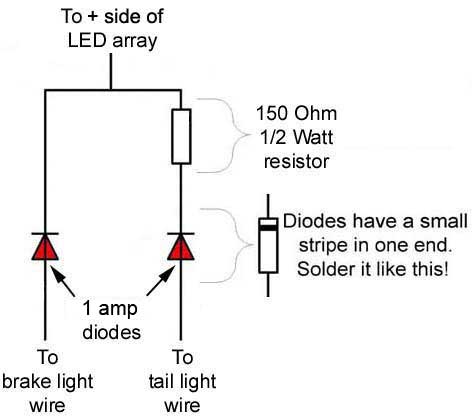
This isn’t so much a process as it is just soldering the circuit together and doing a little bit of testing. The circuit you’ll be building is pictured to the right.
You can test the circuit ahead of time by making temporary connections between all the components and using a car battery or 12V power supply as a power source. I’ve experimented with different resistor values (100, 150, 200 Ohm etc) to get the appropriate “difference” between running and brake brightness and you should too since each LED array will be slightly different. If you get as high as 600 or 700 Ohms you will see as much as a 50-75% difference in brightness. I find the 150 Ohm usually works as a good starting point but with such small costs associated with the price of these 1/2 Watt resistors you should be able to afford to test out a few different sizes to get the look you desire. Once you settle on a resistor for your circuit, use your components, wire, solder, heat shrink tubing, etc to assemble this circuit and insulate the parts from making contact that they shouldn’t. I recommend using different color wires for each lead on the circuit so you can later distinguish which wire goes where, but you can just label them if you want.
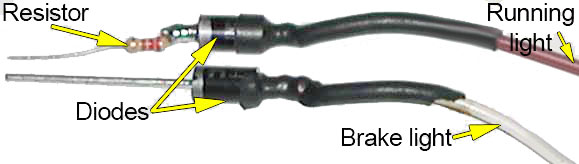
The picture below is of a dual circuit element I used in my tail light mod article. It’s not complete in this picture but it’s close enough that it should give you a decent idea with actual parts (not just a schematic) of what you’re doing.
Once you’ve completed building the circuit and you’ve got enough extra wire coming from both ends to make your connections, you can enclose the entire assembly in heat shrink tubing, electrical tape, or even liquid electrical tape to eliminate any possibility of the unit shorting out against anything when it’s installed. The best install location for most applications is to wire it in under the right side cover, but depending on your specific needs you can also wire this from anywhere that you can pull running and brake light power.
Remember that:
Green = ground
Black w/ brown stripe = running lights
Green w/ yellow stripe = brake lights
That’s it – you’re done – congratulations!
Afterthoughts
This is a great little trick to save a few bucks. I’ve used it on a few custom bikes in specific applications to make a single LED strip, pod, etc function for both running and brake lights, running and turn signals, etc. It’s a very versatile setup and for the cost associated with making one you can save several bucks and have some neat little “custom” accessories on your bike.
Thanks for the info and write up. WORKED GREAT!!!! i used the 220 Ohm resistors
. VERY happy!
and thanks for such detailed and great info through out the entire website. GREAT JOB!
[…]yes. you will need a dual element circuit. I built my own for around $5[…]
[…]I made dual element circuits[…]
[…]bought those same turns and had the same issues with the circuit not working – i was directed to the Bareass Choppers site for a great simple solution[…]
[…] element circuit so the brake light also works as a taillight. Instructions on how do it are here: Dual Circuit Element « Bareass Choppers Motorcycle Tech Pages The big surprise was that the easiest access to the wiring is not under the small rear cover over […]
[…]Here’s a webpage with details. They use it for a rear light but the process is the same for a marker/signal.[…]
[…] You can wire the light to work as both a running and break light with an electrical wiring mod. […]
[…] make your own like this […]
[…] You need to build one of these […]